<?xml version="1.0" encoding="utf-8"?><?xml-stylesheet type="text/xsl" href="atom.xsl"?>
<feed xmlns="http://www.w3.org/2005/Atom">
    <id>https://support.4it.app/blog</id>
    <title>4IT Documentation Center Blog</title>
    <updated>2026-03-29T00:00:00.000Z</updated>
    <generator>https://github.com/jpmonette/feed</generator>
    <link rel="alternate" href="https://support.4it.app/blog"/>
    <subtitle>4IT Documentation Center Blog</subtitle>
    <icon>https://support.4it.app/img/4it.png</icon>
    <entry>
        <title type="html"><![CDATA[AI and Ontology — High Value Added for BI Teams and Business Users]]></title>
        <id>https://support.4it.app/blog/aicds-ontology-high-value-bi</id>
        <link href="https://support.4it.app/blog/aicds-ontology-high-value-bi"/>
        <updated>2026-03-29T00:00:00.000Z</updated>
        <summary type="html"><![CDATA[Business analysts spend their days navigating pre-built dashboards, waiting for new reports, or working around the limits of what was designed weeks or months ago. What if you could ask a question that no report was built to answer — and get a reliable, business-accurate response in seconds?]]></summary>
        <content type="html"><![CDATA[<p>Business analysts spend their days navigating pre-built dashboards, waiting for new reports, or working around the limits of what was designed weeks or months ago. What if you could ask a question that no report was built to answer — and get a reliable, business-accurate response in seconds?</p>
<p>That is what <strong>AI and Ontology</strong> make possible inside the AI@CDS framework.</p>
<h2 class="anchor anchorTargetStickyNavbar_Vzrq" id="the-question-no-dashboard-can-answer">The Question No Dashboard Can Answer<a href="https://support.4it.app/blog/aicds-ontology-high-value-bi#the-question-no-dashboard-can-answer" class="hash-link" aria-label="Direct link to The Question No Dashboard Can Answer" title="Direct link to The Question No Dashboard Can Answer" translate="no">​</a></h2>
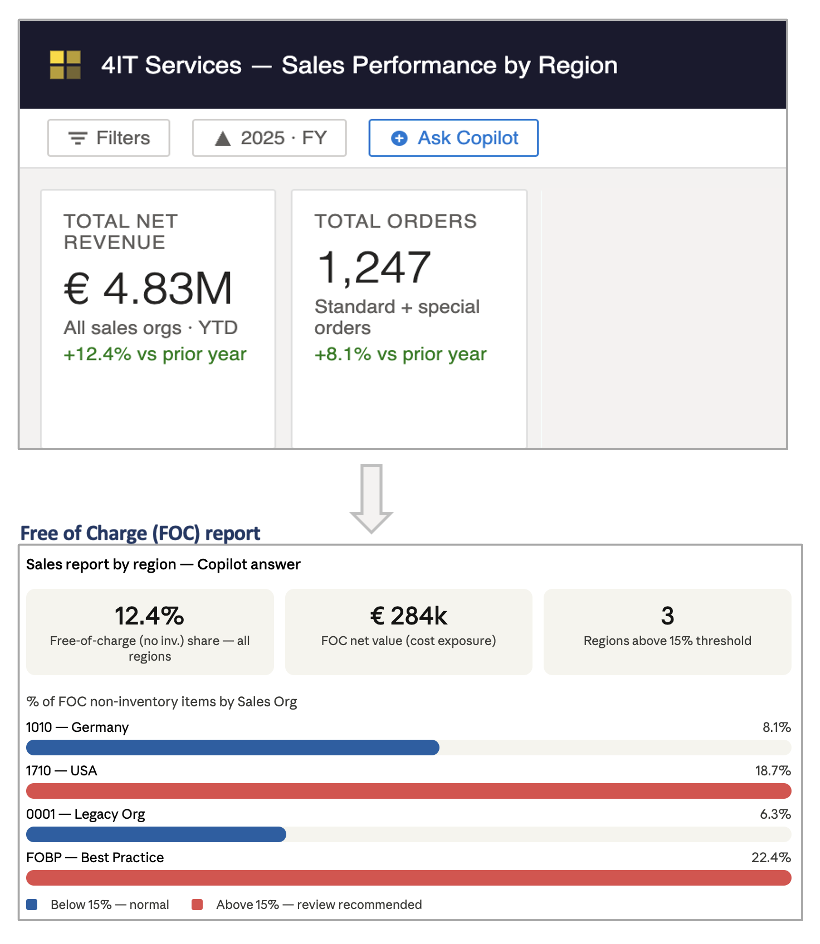
<p>Here is a real example of the kind of question that stops BI teams in their tracks:</p>
<blockquote>
<p><strong>"What is the share of non-inventory free-of-charge items in my sales report by region?"</strong></p>
</blockquote>
<p>This is not a simple filter on a standard report. Answering it correctly requires knowing what "free of charge" means in your SAP configuration, understanding whether an item triggers a stock movement, and being able to cross-reference those rules against sales data — by region.</p>
<p>Traditionally, a developer would need to extract and join multiple SAP tables, understand the SD customising logic, and build a dedicated measure. That takes days, not minutes.</p>
<p>With Ontology and AI, the answer is available on demand.</p>
<p><img decoding="async" loading="lazy" alt="Ontology — Business question answered through Azure AI and Microsoft Fabric Ontology" src="https://support.4it.app/assets/images/ontology-1-4100f12432cd14d7ee13cfc5ff50c9a1.png" width="820" height="944" class="img_ev3q"></p>
<hr>
<h2 class="anchor anchorTargetStickyNavbar_Vzrq" id="how-aicds-integrates-with-ontology-and-sap-spro">How AI@CDS Integrates with Ontology and SAP SPRO<a href="https://support.4it.app/blog/aicds-ontology-high-value-bi#how-aicds-integrates-with-ontology-and-sap-spro" class="hash-link" aria-label="Direct link to How AI@CDS Integrates with Ontology and SAP SPRO" title="Direct link to How AI@CDS Integrates with Ontology and SAP SPRO" translate="no">​</a></h2>
<p>The key to making this work is not just AI — it is <strong>grounding the AI in your actual SAP configuration</strong>.</p>
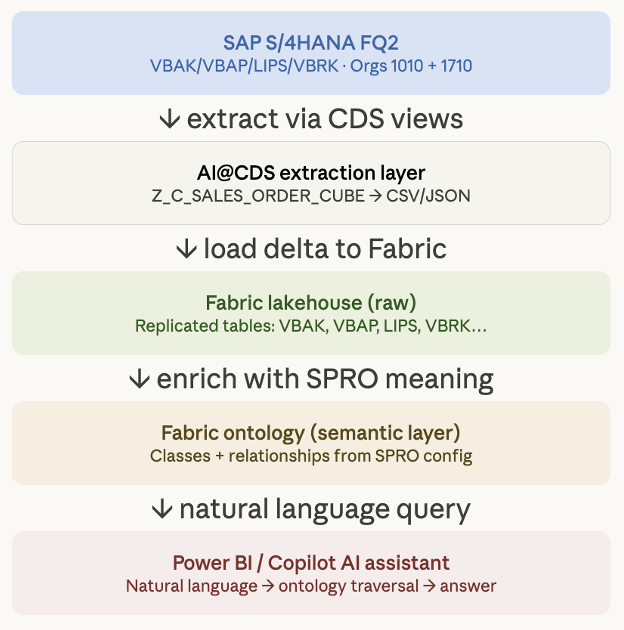
<p>AI@CDS extracts the business rules that live in your SAP backend — primarily from <strong>SPRO customising tables</strong> — and maps them into a <strong>Microsoft Fabric Ontology</strong>. This ontology does not just store data: it captures <em>meaning</em>.</p>
<p>For example:</p>
<ul>
<li class="">
<p>Table <strong>TVAP</strong> defines item categories. If an item category like <code>TANN</code> is configured as not billing-relevant, the ontology records this as the attribute <code>BillingRelevance = NotBillable</code> — or simply <code>FreeOfCharge = true</code>.</p>
<p><em>Note: TANN is used here as a standard SAP example. Item category configuration is always client-specific — your ontology will reflect your own SPRO setup.</em></p>
</li>
<li class="">
<p>Table <strong>TVEP</strong> defines schedule line keys, which determine whether an item triggers a stock movement (goods issue, return, or none). The ontology maps this to <code>InventoryRelevant = false</code> for non-inventory items.</p>
</li>
</ul>
<p>Once these mappings are in place, the Azure AI assistant can reason at the <strong>business concept level</strong> — not at the raw database field level.</p>
<p><img decoding="async" loading="lazy" alt="Ontology — SAP SPRO tables mapped to Microsoft Fabric Ontology attributes" src="https://support.4it.app/assets/images/ontology-2-be851897d128df3ec7cab6b7068cbc0b.png" width="624" height="630" class="img_ev3q"></p>
<p>The extraction and ontology population is handled automatically by the <strong>4IT AI Agents</strong>, which read the CDS views and SPRO configuration from S/4HANA and generate the semantic layer in Azure — including the bronze, silver, and gold pipeline — without manual mapping effort.</p>
<p>For a full walkthrough of how this works step by step, see the <a href="https://4it.app/AI_CDS/overview/ontology-and-ai" target="_blank" rel="noopener noreferrer" class="">AI@CDS Ontology and AI documentation</a>.</p>
<hr>
<p>Beyond the data mapping, the ontology enables genuine <strong>functional reasoning</strong>. When a business user asks about free-of-charge items, the AI can resolve the question by combining the billing relevance rules from item category configuration with the stock movement rules from schedule line configuration — producing a semantically correct, business-level answer. The result can be delivered as a direct insight or as a DAX measure ready to use in a Power BI report.</p>
<hr>
<h2 class="anchor anchorTargetStickyNavbar_Vzrq" id="ontology-is-part-of-the-aicds-framework">Ontology is Part of the AI@CDS Framework<a href="https://support.4it.app/blog/aicds-ontology-high-value-bi#ontology-is-part-of-the-aicds-framework" class="hash-link" aria-label="Direct link to Ontology is Part of the AI@CDS Framework" title="Direct link to Ontology is Part of the AI@CDS Framework" translate="no">​</a></h2>
<p>Ontology is not a standalone add-on — it is a core component of the <strong>4IT AI@CDS framework</strong>, designed from the ground up to work alongside CDS extraction, data platform modelling, and the cloud application.</p>
<p>The entire flow is connected:</p>
<ol>
<li class="">CDS views and SPRO configuration are extracted from SAP S/4HANA</li>
<li class="">AI Agents generate the semantic layers and populate the Microsoft Fabric Ontology</li>
<li class="">The ontology enables the Azure AI assistant to reason about your business — answering ad hoc questions, generating DAX measures, and providing insights that no pre-built report could deliver</li>
</ol>
<p>This is what makes AI@CDS different from a generic data integration tool: the intelligence is embedded in the data model, not bolted on top of it.</p>
<p>→ <a href="https://4it.app/AI_CDS/overview/ontology-and-ai" target="_blank" rel="noopener noreferrer" class="">Explore the full Ontology and AI documentation</a></p>
<hr>
<h2 class="anchor anchorTargetStickyNavbar_Vzrq" id="the-bigger-picture--high-value-added-for-the-business">The Bigger Picture — High Value Added for the Business<a href="https://support.4it.app/blog/aicds-ontology-high-value-bi#the-bigger-picture--high-value-added-for-the-business" class="hash-link" aria-label="Direct link to The Bigger Picture — High Value Added for the Business" title="Direct link to The Bigger Picture — High Value Added for the Business" translate="no">​</a></h2>
<p>The ultimate objective of the AI@CDS framework goes beyond technology. It is about <strong>fundamentally changing the role of the BI team</strong>.</p>
<p>Today, BI and DWH teams spend the majority of their time on extraction, transformation, modelling, and maintenance — leaving limited bandwidth for the work that actually matters to the business: insights, analysis, and decision support. Time-to-customer is too long. Business teams wait. Opportunities are missed.</p>
<p>With AI@CDS and Ontology, the technical pipeline becomes largely automated. BI teams are freed from routine maintenance and positioned to become <strong>champions for the Business</strong> — delivering high-value analytics and strategic intelligence that was simply not possible before. At the same time, <strong>business users gain direct, self-service access to ad hoc insights</strong> — without waiting for a developer to build a new report.</p>
<p>The existing team does not shrink — it grows in impact.</p>
<p>→ <a href="https://4it.app/AI_CDS/overview/value-added" target="_blank" rel="noopener noreferrer" class="">Read more about the Value Added approach</a></p>]]></content>
        <author>
            <name>Jean-Baptiste Mack</name>
        </author>
        <author>
            <name>Greg Varga</name>
        </author>
        <category label="AI@CDS" term="AI@CDS"/>
        <category label="Feature" term="Feature"/>
        <category label="Data Platform" term="Data Platform"/>
        <category label="SAP S/4HANA" term="SAP S/4HANA"/>
    </entry>
    <entry>
        <title type="html"><![CDATA[Introducing AI@Test: AI-Powered SAP Test Automation That Scripts Itself]]></title>
        <id>https://support.4it.app/blog/aitest-launch</id>
        <link href="https://support.4it.app/blog/aitest-launch"/>
        <updated>2026-03-19T00:00:00.000Z</updated>
        <summary type="html"><![CDATA[Writing SAP test scripts has always been a specialist task — expensive, time-consuming, and perpetually out of date. AI@Test changes that: describe your test scenario in plain English and let the AI discover the interface, generate the script, and self-heal any errors along the way.]]></summary>
        <content type="html"><![CDATA[<p>Writing SAP test scripts has always been a specialist task — expensive, time-consuming, and perpetually out of date. <strong>AI@Test</strong> changes that: describe your test scenario in plain English and let the AI discover the interface, generate the script, and self-heal any errors along the way.</p>
<h2 class="anchor anchorTargetStickyNavbar_Vzrq" id="the-problem-with-sap-test-automation">The problem with SAP test automation<a href="https://support.4it.app/blog/aitest-launch#the-problem-with-sap-test-automation" class="hash-link" aria-label="Direct link to The problem with SAP test automation" title="Direct link to The problem with SAP test automation" translate="no">​</a></h2>
<p>Every SAP project needs testing. Regression testing before transports. Integration testing before go-live. Performance testing before peak periods. In most organisations, this testing is either done manually — which is slow and not repeatable — or through test scripts written by specialists and maintained at significant cost.</p>
<p>The challenge is not just writing the initial scripts. It is keeping them current. A transport changes a field label. A support package moves a button. A configuration change adds a new popup. Each change silently breaks a test script, and the next test run produces failures that are not real defects — just stale automation.</p>
<p><strong>AI@Test</strong> is designed to make this problem obsolete.</p>
<hr>
<h2 class="anchor anchorTargetStickyNavbar_Vzrq" id="from-description-to-executable-test">From description to executable test<a href="https://support.4it.app/blog/aitest-launch#from-description-to-executable-test" class="hash-link" aria-label="Direct link to From description to executable test" title="Direct link to From description to executable test" translate="no">​</a></h2>
<p>The starting point is a plain-language description:</p>
<blockquote>
<p><em>"Test the SAP SD return order flow: create a return sales order in VA01 with document type RE, process the return delivery in VL01N, confirm goods receipt, and issue a credit memo in VF01."</em></p>
</blockquote>
<p>AI@Test reads this description and generates a fully structured, executable test script — with the correct transactions, field entries, assertions, and success criteria. No recorder. No scripting tool. No field-ID lookup.</p>
<div title="Click to enlarge" style="overflow-x:auto;margin:2rem 0;cursor:zoom-in;zoom:0.85"><p style="text-align:center;color:#94a3b8;font-size:0.68rem;margin:0 0 0.5rem;letter-spacing:0.05em">🔍 CLICK TO ENLARGE</p><div style="background:#0d1117;border-radius:12px;padding:1.5rem;font-family:monospace;min-width:600px"><div style="display:flex;align-items:center;gap:0.75rem;flex-wrap:wrap"><div style="border:1px solid #3b82f6;border-radius:8px;padding:0.6rem 0.9rem;background:#3b82f615;text-align:center;min-width:100px"><div style="font-size:1.1rem">💬</div><div style="color:#3b82f6;font-weight:700;font-size:0.75rem;margin-top:0.2rem">Plain language</div></div><div style="color:#475569;font-size:1.2rem">→</div><div style="border:1px solid #8b5cf6;border-radius:8px;padding:0.6rem 0.9rem;background:#8b5cf615;text-align:center;min-width:100px"><div style="font-size:1.1rem">🤖</div><div style="color:#8b5cf6;font-weight:700;font-size:0.75rem;margin-top:0.2rem">AI@Test Engine</div></div><div style="color:#475569;font-size:1.2rem">→</div><div style="border:1px solid #10b981;border-radius:8px;padding:0.6rem 0.9rem;background:#10b98115;text-align:center;min-width:100px"><div style="font-size:1.1rem">📋</div><div style="color:#10b981;font-weight:700;font-size:0.75rem;margin-top:0.2rem">Test script</div></div><div style="color:#475569;font-size:1.2rem">→</div><div style="border:1px solid #f59e0b;border-radius:8px;padding:0.6rem 0.9rem;background:#f59e0b15;text-align:center;min-width:100px"><div style="font-size:1.1rem">🖥️</div><div style="color:#f59e0b;font-weight:700;font-size:0.75rem;margin-top:0.2rem">SAP execution</div></div><div style="color:#475569;font-size:1.2rem">→</div><div style="border:1px solid #10b981;border-radius:8px;padding:0.6rem 0.9rem;background:#10b98115;text-align:center;min-width:100px"><div style="font-size:1.1rem">✅</div><div style="color:#10b981;font-weight:700;font-size:0.75rem;margin-top:0.2rem">Result</div></div></div></div></div>
<hr>
<h2 class="anchor anchorTargetStickyNavbar_Vzrq" id="it-discovers-the-interface-at-runtime">It discovers the interface at runtime<a href="https://support.4it.app/blog/aitest-launch#it-discovers-the-interface-at-runtime" class="hash-link" aria-label="Direct link to It discovers the interface at runtime" title="Direct link to It discovers the interface at runtime" translate="no">​</a></h2>
<p>Traditional test automation tools require you to record or code every screen interaction. When the screen changes, the recording breaks.</p>
<p>AI@Test does not record. When it runs a test step, it connects to the live SAP interface — whether that is a SAP GUI Desktop transaction or a Fiori web application — and reads the current screen state in real time. It sees every field, every button, every label, as they exist at the moment of execution.</p>
<p>This means the test adapts automatically to screen changes. If a field moved, the agent finds it by label. If a popup appeared, the agent reads its content and handles it. The test is resilient by design.</p>
<hr>
<h2 class="anchor anchorTargetStickyNavbar_Vzrq" id="connected-to-your-actual-system-configuration">Connected to your actual system configuration<a href="https://support.4it.app/blog/aitest-launch#connected-to-your-actual-system-configuration" class="hash-link" aria-label="Direct link to Connected to your actual system configuration" title="Direct link to Connected to your actual system configuration" translate="no">​</a></h2>
<p>When an <strong>AI@KB</strong> knowledge base report is available for your SAP system, AI@Test uses it to ground the generated test cases in your specific configuration — not a generic SAP template.</p>
<p>The document types, delivery types, pricing conditions, and process variants configured in your system are read from the AI@KB extract. The test script reflects what your system actually does, not what a reference model says it should do.</p>
<div title="Click to enlarge" style="overflow-x:auto;margin:2rem 0;cursor:zoom-in;zoom:0.85"><p style="text-align:center;color:#94a3b8;font-size:0.68rem;margin:0 0 0.5rem;letter-spacing:0.05em">🔍 CLICK TO ENLARGE</p><div style="background:#0d1117;border-radius:12px;padding:1.5rem;font-family:monospace;min-width:600px"><div style="display:flex;gap:1rem;flex-wrap:wrap"><div style="flex:1;min-width:120px;border:1px solid #06b6d4;border-radius:10px;padding:1rem;background:#06b6d412;text-align:center"><div style="font-size:1.3rem;margin-bottom:0.3rem">📚</div><div style="color:#06b6d4;font-weight:700;font-size:0.8rem">AI@KB Report</div><div style="color:#64748b;font-size:0.7rem;margin-top:0.3rem;white-space:pre-line">System configuration
extracted &amp; structured</div></div><div style="color:#334155;font-size:1.2rem;align-self:center">→</div><div style="flex:1;min-width:120px;border:1px solid #8b5cf6;border-radius:10px;padding:1rem;background:#8b5cf612;text-align:center"><div style="font-size:1.3rem;margin-bottom:0.3rem">🤖</div><div style="color:#8b5cf6;font-weight:700;font-size:0.8rem">AI@Test</div><div style="color:#64748b;font-size:0.7rem;margin-top:0.3rem;white-space:pre-line">Reads config · Designs
system-accurate test</div></div><div style="color:#334155;font-size:1.2rem;align-self:center">→</div><div style="flex:1;min-width:120px;border:1px solid #10b981;border-radius:10px;padding:1rem;background:#10b98112;text-align:center"><div style="font-size:1.3rem;margin-bottom:0.3rem">📋</div><div style="color:#10b981;font-weight:700;font-size:0.8rem">Test Script</div><div style="color:#64748b;font-size:0.7rem;margin-top:0.3rem;white-space:pre-line">Uses your document
types · your variants</div></div><div style="color:#334155;font-size:1.2rem;align-self:center">→</div><div style="flex:1;min-width:120px;border:1px solid #f59e0b;border-radius:10px;padding:1rem;background:#f59e0b12;text-align:center"><div style="font-size:1.3rem;margin-bottom:0.3rem">🏢</div><div style="color:#f59e0b;font-weight:700;font-size:0.8rem">Your SAP System</div><div style="color:#64748b;font-size:0.7rem;margin-top:0.3rem;white-space:pre-line">Tested against
real configuration</div></div></div></div></div>
<hr>
<h2 class="anchor anchorTargetStickyNavbar_Vzrq" id="self-healing-execution">Self-healing execution<a href="https://support.4it.app/blog/aitest-launch#self-healing-execution" class="hash-link" aria-label="Direct link to Self-healing execution" title="Direct link to Self-healing execution" translate="no">​</a></h2>
<p>When a test step encounters an error, AI@Test does not immediately fail. It reads the situation — the SAP status bar message, any popup dialog, the current screen state — and attempts a correction before retrying.</p>
<p>In most cases the error is resolved without any human intervention. When it cannot be resolved, a defect is created automatically in Jira Xray or qTest, complete with the exact error message, the test data used, and a screenshot of the failing screen.</p>
<hr>
<h2 class="anchor anchorTargetStickyNavbar_Vzrq" id="what-it-means-for-your-team">What it means for your team<a href="https://support.4it.app/blog/aitest-launch#what-it-means-for-your-team" class="hash-link" aria-label="Direct link to What it means for your team" title="Direct link to What it means for your team" translate="no">​</a></h2>
<table><thead><tr><th>Role</th><th>Benefit</th></tr></thead><tbody><tr><td><strong>Functional consultant</strong></td><td>Define test scenarios in plain language — no scripting skills needed</td></tr><tr><td><strong>Test manager</strong></td><td>Schedule, monitor, and report across all test scenarios from one interface</td></tr><tr><td><strong>QA engineer</strong></td><td>Spend time on analysis and edge cases, not script maintenance</td></tr><tr><td><strong>Project manager</strong></td><td>Real-time test dashboards and AI-generated PDF reports for sign-off reviews</td></tr></tbody></table>
<hr>
<h2 class="anchor anchorTargetStickyNavbar_Vzrq" id="available-now">Available now<a href="https://support.4it.app/blog/aitest-launch#available-now" class="hash-link" aria-label="Direct link to Available now" title="Direct link to Available now" translate="no">​</a></h2>
<p>AI@Test documentation is available at <a class="" href="https://support.4it.app/AI_TEST/intro">AI@Test docs</a>. Contact 4IT Services for access and onboarding.</p>]]></content>
        <author>
            <name>Jean-Baptiste Mack</name>
        </author>
        <category label="AI@Test" term="AI@Test"/>
        <category label="Feature" term="Feature"/>
        <category label="SAP S/4HANA" term="SAP S/4HANA"/>
    </entry>
    <entry>
        <title type="html"><![CDATA[Introducing AI@BPMN: From Text to Process Diagram in Seconds]]></title>
        <id>https://support.4it.app/blog/aibpmn-process-flow-generator</id>
        <link href="https://support.4it.app/blog/aibpmn-process-flow-generator"/>
        <updated>2026-03-18T00:00:00.000Z</updated>
        <summary type="html"><![CDATA[Process documentation has always been slow. Workshops, manual drawing, review cycles. AI@BPMN changes the equation: describe a business process in plain language and get a standards-compliant BPMN diagram in seconds — enriched with SAP best practices and ready to publish to Signavio.]]></summary>
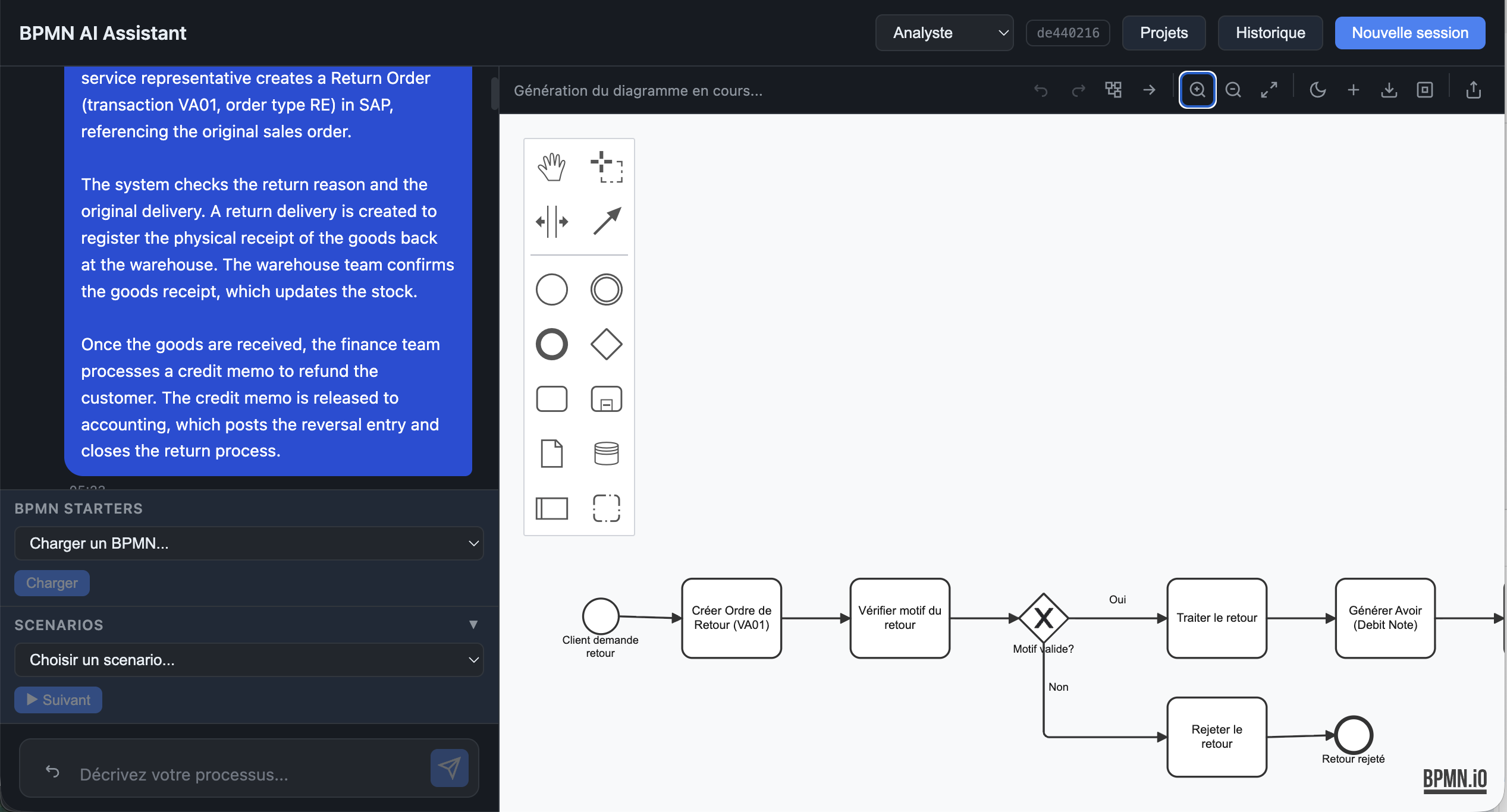
        <content type="html"><![CDATA[<p>Process documentation has always been slow. Workshops, manual drawing, review cycles. <strong>AI@BPMN</strong> changes the equation: describe a business process in plain language and get a standards-compliant BPMN diagram in seconds — enriched with SAP best practices and ready to publish to Signavio.</p>
<p><img decoding="async" loading="lazy" alt="AI@BPMN — SAP SD Return Order process generated from a text description" src="https://support.4it.app/assets/images/bpmn-generated-0f421e3ad3cb829a6e0826bb746ef269.png" width="2534" height="1366" class="img_ev3q"></p>
<h2 class="anchor anchorTargetStickyNavbar_Vzrq" id="from-description-to-diagram">From description to diagram<a href="https://support.4it.app/blog/aibpmn-process-flow-generator#from-description-to-diagram" class="hash-link" aria-label="Direct link to From description to diagram" title="Direct link to From description to diagram" translate="no">​</a></h2>
<p>The idea is simple: instead of opening a modelling tool and drawing boxes and arrows, you describe what happens. A customer requests a return. A return order is created in VA01. The warehouse confirms receipt. Finance issues a credit memo.</p>
<p>AI@BPMN reads that description and produces a BPMN 2.0 diagram with the correct elements — start events, tasks, gateways, sequence flows, end events — laid out and labelled automatically. The result is a properly structured diagram that follows BPMN notation, not a rough sketch.</p>
<p>The generation takes a few seconds. The diagram appears directly in the embedded BPMN.io modeler, ready to review, edit, or export.</p>
<hr>
<h2 class="anchor anchorTargetStickyNavbar_Vzrq" id="aligned-to-sap-standards">Aligned to SAP standards<a href="https://support.4it.app/blog/aibpmn-process-flow-generator#aligned-to-sap-standards" class="hash-link" aria-label="Direct link to Aligned to SAP standards" title="Direct link to Aligned to SAP standards" translate="no">​</a></h2>
<p>What sets AI@BPMN apart from a general-purpose diagram generator is its knowledge base. The application draws on a curated RAG (Retrieval-Augmented Generation) knowledge base containing SAP reference process models and company standard process templates.</p>
<p>This means the generated diagram is not just syntactically correct — it reflects how processes are actually structured in SAP environments. Transaction codes, document types, posting logic, and inter-module handoffs are incorporated where relevant, giving the output immediate credibility with SAP project teams.</p>
<hr>
<h2 class="anchor anchorTargetStickyNavbar_Vzrq" id="one-click-to-signavio">One click to Signavio<a href="https://support.4it.app/blog/aibpmn-process-flow-generator#one-click-to-signavio" class="hash-link" aria-label="Direct link to One click to Signavio" title="Direct link to One click to Signavio" translate="no">​</a></h2>
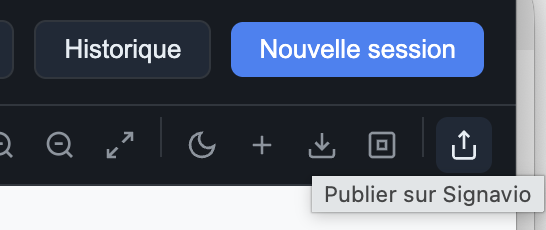
<p>Once the diagram is reviewed, publishing it to SAP Signavio Process Manager takes a single click.</p>
<p><img decoding="async" loading="lazy" alt="Publish to Signavio — direct transfer from AI@BPMN to Signavio Process Manager" src="https://support.4it.app/assets/images/publish-signavio-787e85fe2d9af534d0a06d492c13c8e1.png" width="546" height="230" class="img_ev3q"></p>
<p>The application sends the BPMN XML directly to the Signavio workspace via the standard Signavio public API. No file download, no manual import. The diagram appears in Signavio with all its elements intact, ready for governance, collaboration, and further enrichment by process owners.</p>
<hr>
<h2 class="anchor anchorTargetStickyNavbar_Vzrq" id="what-it-means-in-practice">What it means in practice<a href="https://support.4it.app/blog/aibpmn-process-flow-generator#what-it-means-in-practice" class="hash-link" aria-label="Direct link to What it means in practice" title="Direct link to What it means in practice" translate="no">​</a></h2>
<p>For a consultant preparing for a fit-gap workshop, AI@BPMN cuts the time to produce a process baseline from half a day to five minutes. For a business analyst documenting an existing process from meeting notes, it removes the need for a dedicated modelling session. For a team aligning a custom process to SAP standards, it provides a structured starting point grounded in reference architecture.</p>
<p>The full documentation is available at <a class="" href="https://support.4it.app/AI_BPMN/intro">AI@BPMN docs</a>.</p>]]></content>
        <author>
            <name>Jean-Baptiste Mack</name>
        </author>
        <category label="AI@BPMN" term="AI@BPMN"/>
        <category label="Feature" term="Feature"/>
        <category label="SAP S/4HANA" term="SAP S/4HANA"/>
    </entry>
    <entry>
        <title type="html"><![CDATA[Introducing AI@KB: Generate Up-to-Date SAP Documentation from Your Live System]]></title>
        <id>https://support.4it.app/blog/aikb-knowledge-base-launch</id>
        <link href="https://support.4it.app/blog/aikb-knowledge-base-launch"/>
        <updated>2026-03-12T00:00:00.000Z</updated>
        <summary type="html"><![CDATA[Every SAP implementation produces documentation. Most of it is out of date within months. AI@KB takes a different approach: it reads your SAP system directly — configuration tables, SPRO settings, transactional data — and generates structured, data-validated documentation on demand.]]></summary>
        <content type="html"><![CDATA[<p>Every SAP implementation produces documentation. Most of it is out of date within months. <strong>AI@KB</strong> takes a different approach: it reads your SAP system directly — configuration tables, SPRO settings, transactional data — and generates structured, data-validated documentation on demand.</p>
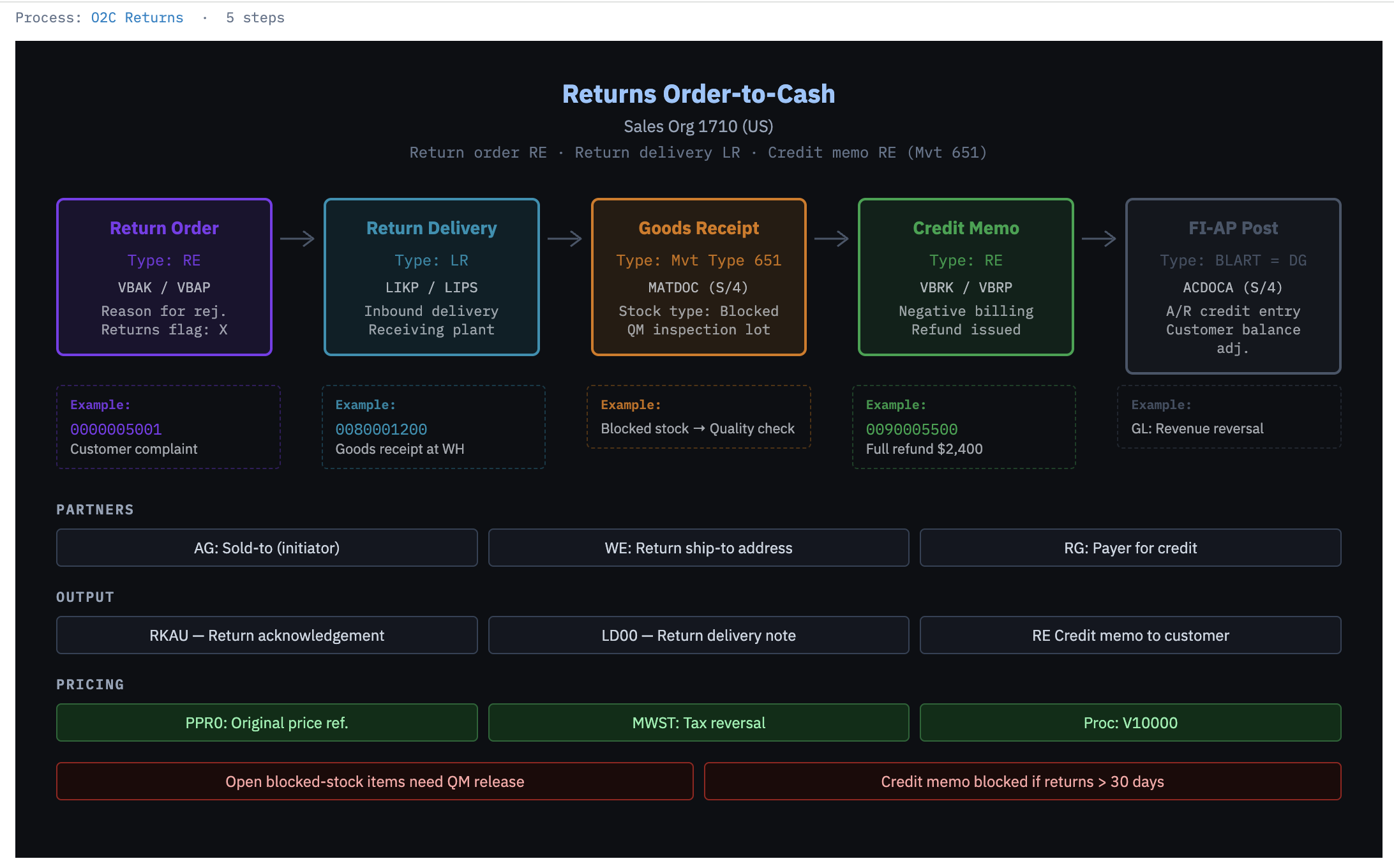
<p><img decoding="async" loading="lazy" alt="Returns Order-to-Cash process flow — rendered directly from system data" src="https://support.4it.app/assets/images/process-flow-061984f637f1488cefee2a02ae0ecd31.png" width="2184" height="1360" class="img_ev3q"></p>
<h2 class="anchor anchorTargetStickyNavbar_Vzrq" id="the-problem-with-sap-documentation">The problem with SAP documentation<a href="https://support.4it.app/blog/aikb-knowledge-base-launch#the-problem-with-sap-documentation" class="hash-link" aria-label="Direct link to The problem with SAP documentation" title="Direct link to The problem with SAP documentation" translate="no">​</a></h2>
<p>SAP projects generate a lot of paperwork. Business blueprints, configuration workbooks, test scripts, cutover plans. By the time a system goes live, much of that documentation is already stale. After go-live, it rarely keeps pace with the changes and enhancements that follow.</p>
<p>The result is a gap between what the documentation says and what the system actually does. That gap causes real problems: slower onboarding for new team members, uncertainty during audits, wasted time in workshops where consultants reconstruct configuration from scratch.</p>
<p>AI@KB closes that gap by making documentation a live output of the system, not a one-time artefact.</p>
<hr>
<h2 class="anchor anchorTargetStickyNavbar_Vzrq" id="what-aikb-does">What AI@KB does<a href="https://support.4it.app/blog/aikb-knowledge-base-launch#what-aikb-does" class="hash-link" aria-label="Direct link to What AI@KB does" title="Direct link to What AI@KB does" translate="no">​</a></h2>
<p>AI@KB connects to your SAP ERP system and extracts three categories of information:</p>
<ul>
<li class=""><strong>SPRO configuration</strong> — customising tables, condition types, pricing procedures, document type assignments, output determination, and more</li>
<li class=""><strong>Transactional data</strong> — counts, volumes, and representative document examples that show which configuration is actually used in practice</li>
<li class=""><strong>Process flows</strong> — end-to-end business process definitions that map how documents flow through the system from initiation to FI posting</li>
</ul>
<p>From this, the App tab provides three tools.</p>
<hr>
<h2 class="anchor anchorTargetStickyNavbar_Vzrq" id="process-viewer--see-how-your-system-flows">Process Viewer — see how your system flows<a href="https://support.4it.app/blog/aikb-knowledge-base-launch#process-viewer--see-how-your-system-flows" class="hash-link" aria-label="Direct link to Process Viewer — see how your system flows" title="Direct link to Process Viewer — see how your system flows" translate="no">​</a></h2>
<p>The Process Viewer renders any SAP business process as a colour-coded flow diagram. Select the system, module, and process from three dropdowns — for example, <em>Sales &amp; Distribution → O2C Returns</em> — and click Load.</p>
<p>The diagram shows each step in the document chain, with real document numbers, movement types, partner functions, and output types taken from the extracted data. Not a template. Not a reference model. Your system, as it runs today.</p>
<hr>
<h2 class="anchor anchorTargetStickyNavbar_Vzrq" id="chat--ask-questions-get-sourced-answers">Chat — ask questions, get sourced answers<a href="https://support.4it.app/blog/aikb-knowledge-base-launch#chat--ask-questions-get-sourced-answers" class="hash-link" aria-label="Direct link to Chat — ask questions, get sourced answers" title="Direct link to Chat — ask questions, get sourced answers" translate="no">​</a></h2>
<p>The Chat panel understands your system's configuration and extracted data. Ask plain-language questions and receive structured answers with direct references to the source files they came from.</p>
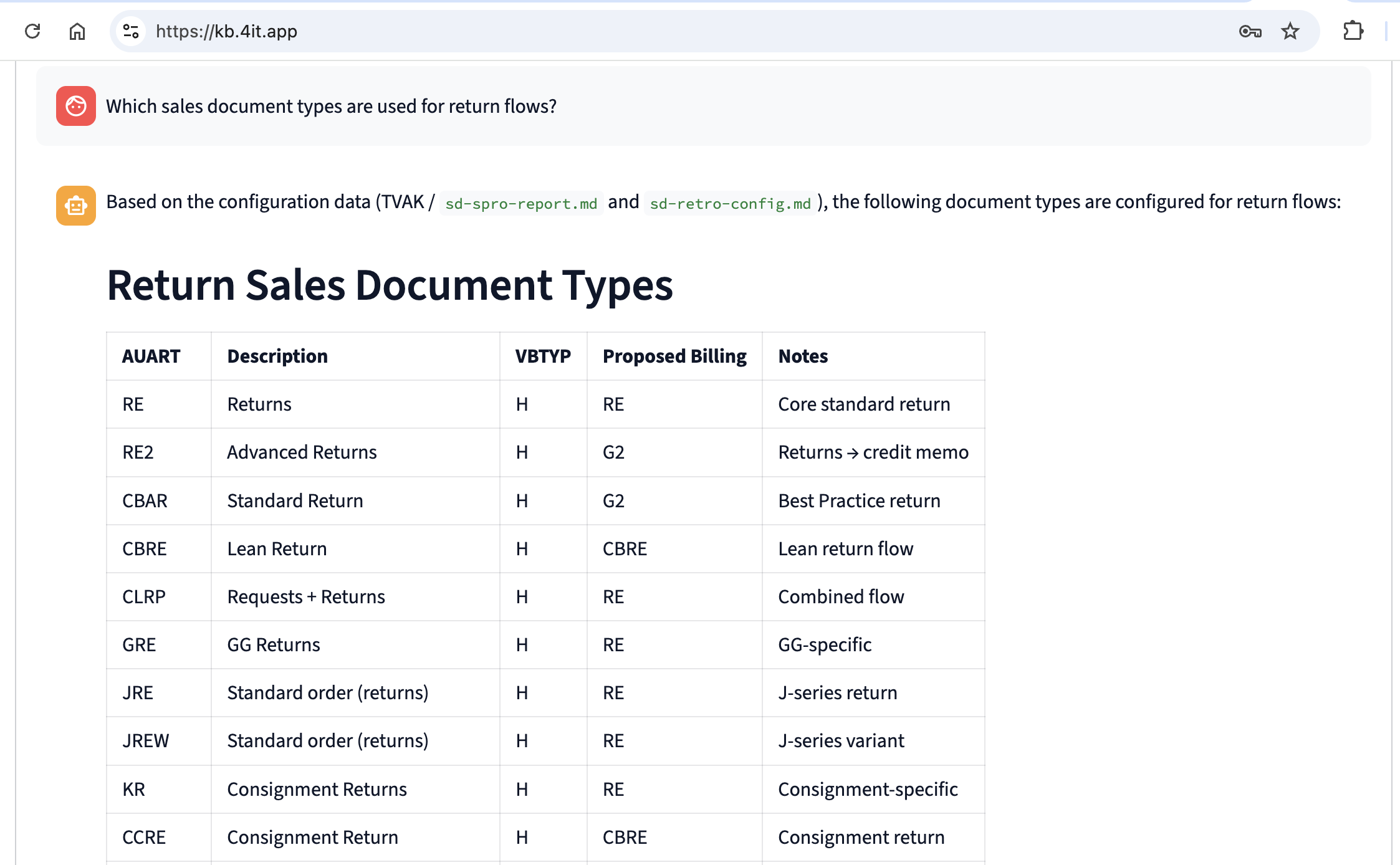
<p><img decoding="async" loading="lazy" alt="Chat answer — Return Sales Document Types extracted from system configuration" src="https://support.4it.app/assets/images/chat-answer-53db899ccfdd83a88d9304a7d051ef45.png" width="2246" height="1388" class="img_ev3q"></p>
<p>A question like <em>"Which sales document types are used for return flows?"</em> returns a formatted table of document types with VBTYP categories, proposed billing types, and notes — all sourced from the extracted SPRO configuration and cross-validated against transactional evidence.</p>
<p>Every answer includes a reference to the specific configuration file or data extract it came from, making findings fully traceable and auditable.</p>
<hr>
<h2 class="anchor anchorTargetStickyNavbar_Vzrq" id="documentation-generation--a-complete-system-knowledge-base-on-demand">Documentation Generation — a complete system knowledge base, on demand<a href="https://support.4it.app/blog/aikb-knowledge-base-launch#documentation-generation--a-complete-system-knowledge-base-on-demand" class="hash-link" aria-label="Direct link to Documentation Generation — a complete system knowledge base, on demand" title="Direct link to Documentation Generation — a complete system knowledge base, on demand" translate="no">​</a></h2>
<p>The Documentation Generation panel produces a structured, professional-grade document covering the configuration and data landscape of a chosen module. Select the sections you want — configuration, existing data, integration flows, output management — and click <strong>▶ Start generation</strong>. The document is prepared and delivered by email.</p>
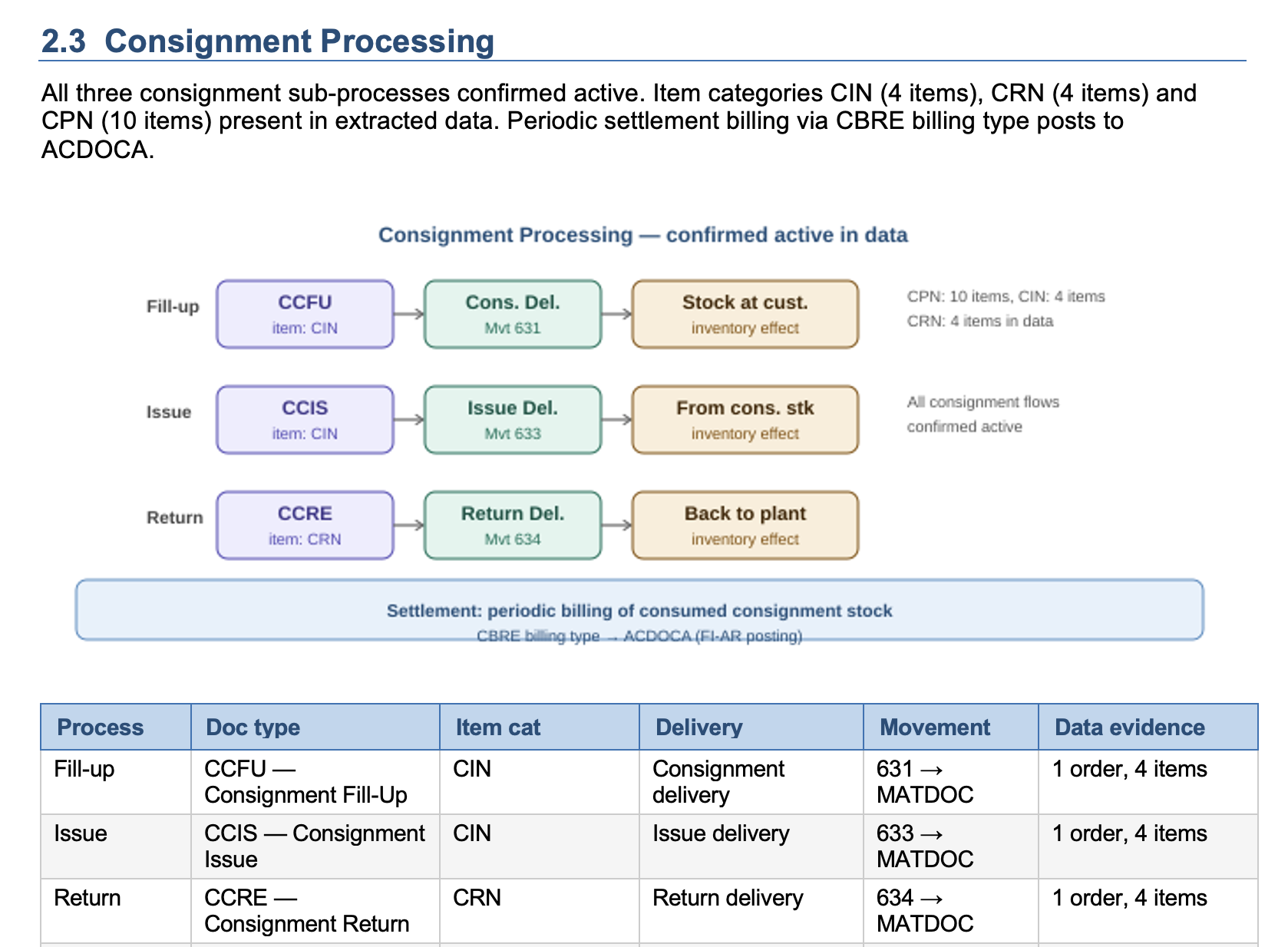
<p><img decoding="async" loading="lazy" alt="Generated document — cover page for SAP SD Retro-Documentation" src="https://support.4it.app/assets/images/AI_KB_01-0f5615d9495c16314d361e360df23071.png" width="1678" height="1234" class="img_ev3q"></p>
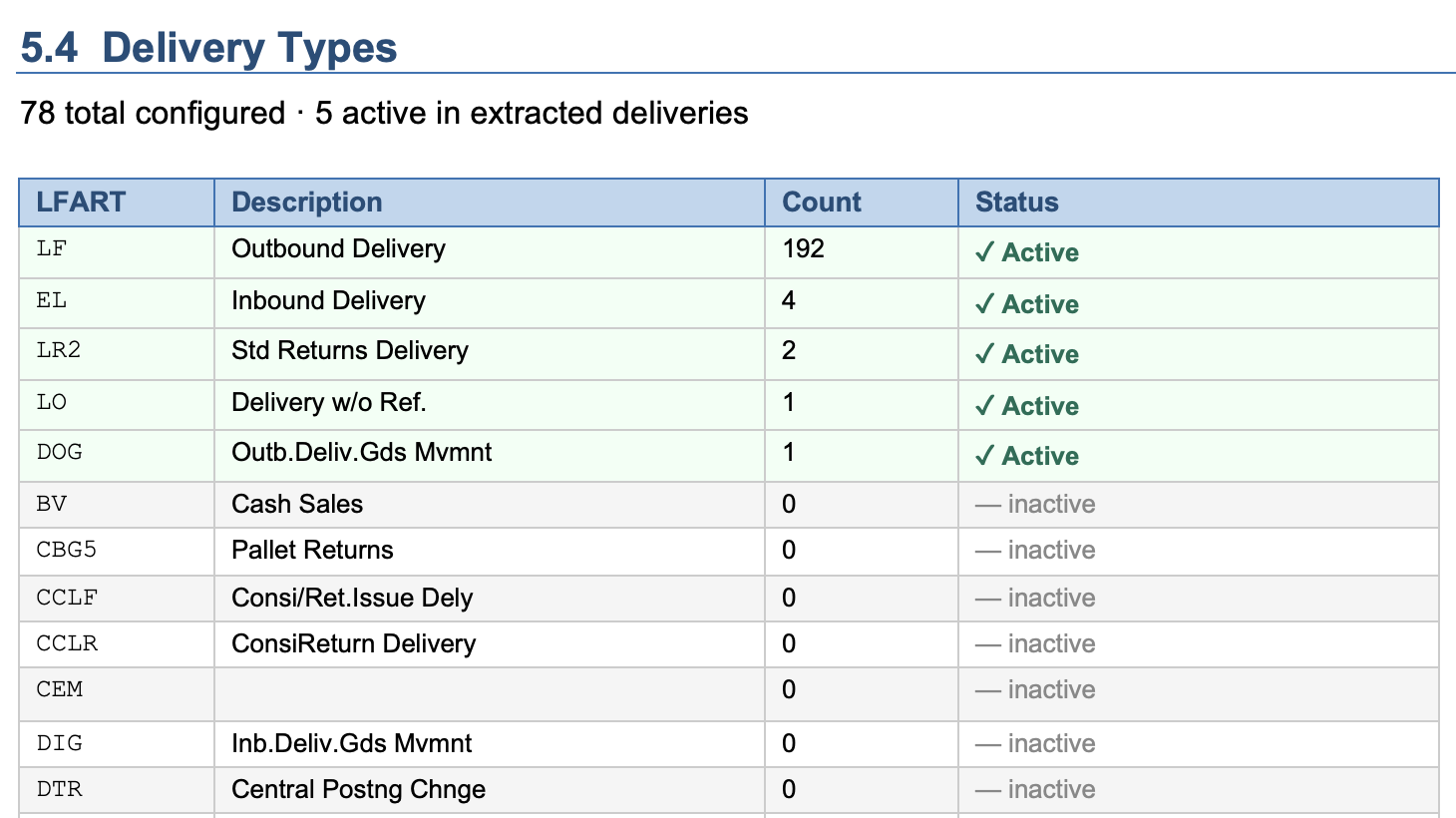
<p><img decoding="async" loading="lazy" alt="Generated document — SAP SD Retro-Documentation detail" src="https://support.4it.app/assets/images/AI_KB_02-3be704461c5db2250054073408877b66.png" width="1460" height="820" class="img_ev3q"></p>
<p>The generated document is structured like a professional configuration review:</p>
<ul>
<li class=""><strong>Cover page</strong> with system metadata (client, version, extraction date, primary org unit)</li>
<li class=""><strong>Key findings at a glance</strong> — transaction volumes, unique entity counts, financial totals</li>
<li class=""><strong>Process-level sections</strong> — Standard O2C, Returns, Free of Charge, Consignment, and other configured variants, each with a flow diagram and data evidence</li>
<li class=""><strong>Integration architecture</strong> — IDoc/ALE, NAST, and EWM/WM layers with actual counts and error rates</li>
<li class=""><strong>Gaps and recommended follow-up</strong> — configuration objects with no transactional evidence, prioritised for review</li>
<li class=""><strong>Full configuration tables</strong> — every relevant object (delivery types, billing types, item categories, pricing conditions) with an Active flag derived from transactional data</li>
</ul>
<p>The Active flag is the feature teams find most immediately useful: it tells you at a glance which of the 78 configured delivery types are actually used in practice (5, in the example above) and which have never appeared in a real transaction.</p>
<hr>
<h2 class="anchor anchorTargetStickyNavbar_Vzrq" id="who-is-aikb-for">Who is AI@KB for?<a href="https://support.4it.app/blog/aikb-knowledge-base-launch#who-is-aikb-for" class="hash-link" aria-label="Direct link to Who is AI@KB for?" title="Direct link to Who is AI@KB for?" translate="no">​</a></h2>
<p>AI@KB is designed for three audiences:</p>
<ul>
<li class=""><strong>Implementation consultants</strong> running fit-gap workshops or preparing for an S/4HANA migration — AI@KB gives them a current-state baseline in hours, not days</li>
<li class=""><strong>BI and data teams</strong> who need to understand the source system before building data models and reports</li>
<li class=""><strong>Internal teams</strong> managing a live SAP system who want auditable, up-to-date documentation without maintaining it manually</li>
</ul>
<hr>
<h2 class="anchor anchorTargetStickyNavbar_Vzrq" id="available-now">Available now<a href="https://support.4it.app/blog/aikb-knowledge-base-launch#available-now" class="hash-link" aria-label="Direct link to Available now" title="Direct link to Available now" translate="no">​</a></h2>
<p>AI@KB is live at <a href="https://kb.4it.app/" target="_blank" rel="noopener noreferrer" class="">kb.4it.app</a>. Full documentation for the App tab is available in the <a class="" href="https://support.4it.app/AI_KB/cloud-application/app-tab">AI@KB documentation</a>.</p>]]></content>
        <author>
            <name>Greg Varga</name>
        </author>
        <category label="AI@KB" term="AI@KB"/>
        <category label="Feature" term="Feature"/>
        <category label="SAP S/4HANA" term="SAP S/4HANA"/>
        <category label="Data Platform" term="Data Platform"/>
    </entry>
    <entry>
        <title type="html"><![CDATA[AI@CDS Setup Tab: CDS Designer, CDS Manager and SQL Manager]]></title>
        <id>https://support.4it.app/blog/aicds-setup-tab-cds-designer-manager-sql</id>
        <link href="https://support.4it.app/blog/aicds-setup-tab-cds-designer-manager-sql"/>
        <updated>2026-03-11T00:00:00.000Z</updated>
        <summary type="html"><![CDATA[The latest release of the AI@CDS Cloud Application introduces a fully featured Setup tab — a tooling workspace designed for 4IT implementation partners and BI Competency Centres. Three new panels make it significantly faster to create customer-specific CDS views, inspect the full CDS view catalogue, and generate platform-ready SQL from any Business Template or RapidViews CDS layer.]]></summary>
        <content type="html"><![CDATA[<p>The latest release of the <strong>AI@CDS Cloud Application</strong> introduces a fully featured <strong>Setup tab</strong> — a tooling workspace designed for 4IT implementation partners and BI Competency Centres. Three new panels make it significantly faster to create customer-specific CDS views, inspect the full CDS view catalogue, and generate platform-ready SQL from any Business Template or RapidViews CDS layer.</p>
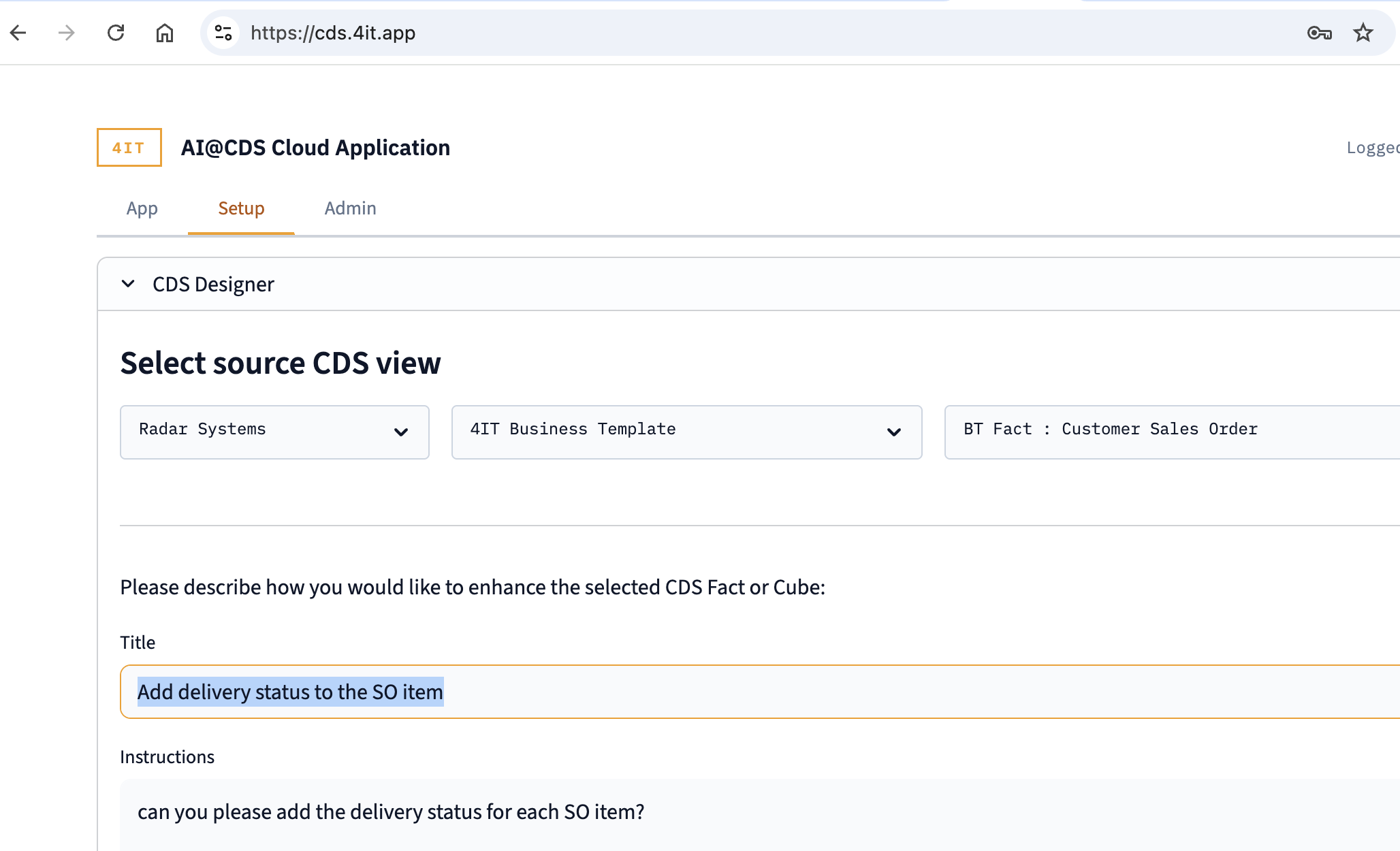
<p><img decoding="async" loading="lazy" alt="CDS Designer — entering an enhancement request" src="https://support.4it.app/assets/images/cds-designer-form-288228b2e29ed7318bff2102990ad953.png" width="2056" height="1250" class="img_ev3q"></p>
<h2 class="anchor anchorTargetStickyNavbar_Vzrq" id="the-gap-we-set-out-to-close">The gap we set out to close<a href="https://support.4it.app/blog/aicds-setup-tab-cds-designer-manager-sql#the-gap-we-set-out-to-close" class="hash-link" aria-label="Direct link to The gap we set out to close" title="Direct link to The gap we set out to close" translate="no">​</a></h2>
<p>AI@CDS has always been strong at helping business and BI users <em>understand</em> SAP data models — through its interactive diagram viewer, AI Chat, and use-case documentation. What was missing was a productive workspace for the consultants and BI architects who need to <em>act on</em> that understanding: customise a standard template for a specific customer, quickly pull up the source code of a view they are working with, or translate a CDS view into SQL for a cloud platform.</p>
<p>The Setup tab closes that gap with three tools that work together naturally in a typical implementation workflow.</p>
<hr>
<h2 class="anchor anchorTargetStickyNavbar_Vzrq" id="cds-designer--ai-generated-customer-variants-in-seconds">CDS Designer — AI-generated customer variants in seconds<a href="https://support.4it.app/blog/aicds-setup-tab-cds-designer-manager-sql#cds-designer--ai-generated-customer-variants-in-seconds" class="hash-link" aria-label="Direct link to CDS Designer — AI-generated customer variants in seconds" title="Direct link to CDS Designer — AI-generated customer variants in seconds" translate="no">​</a></h2>
<p>Every 4IT Business Template is a solid foundation, but real-world implementations almost always require customer-specific adjustments. A field that appears in one customer's ERP may need to be surfaced in the CDS layer; a specific calculation, status code, or account assignment field may be needed that is not in the standard template.</p>
<p>Previously this meant opening ABAP Development Tools, copying the source view, manually adding the field, updating annotations, and deploying — a process that takes time and requires deep CDS knowledge.</p>
<p>With the CDS Designer, a partner can:</p>
<ol>
<li class="">Select the source CDS view using three dropdowns (customer context → category → view)</li>
<li class="">Enter a short title and plain-language instructions describing what needs to change</li>
<li class="">Click <strong>▶ Start the Designer</strong></li>
</ol>
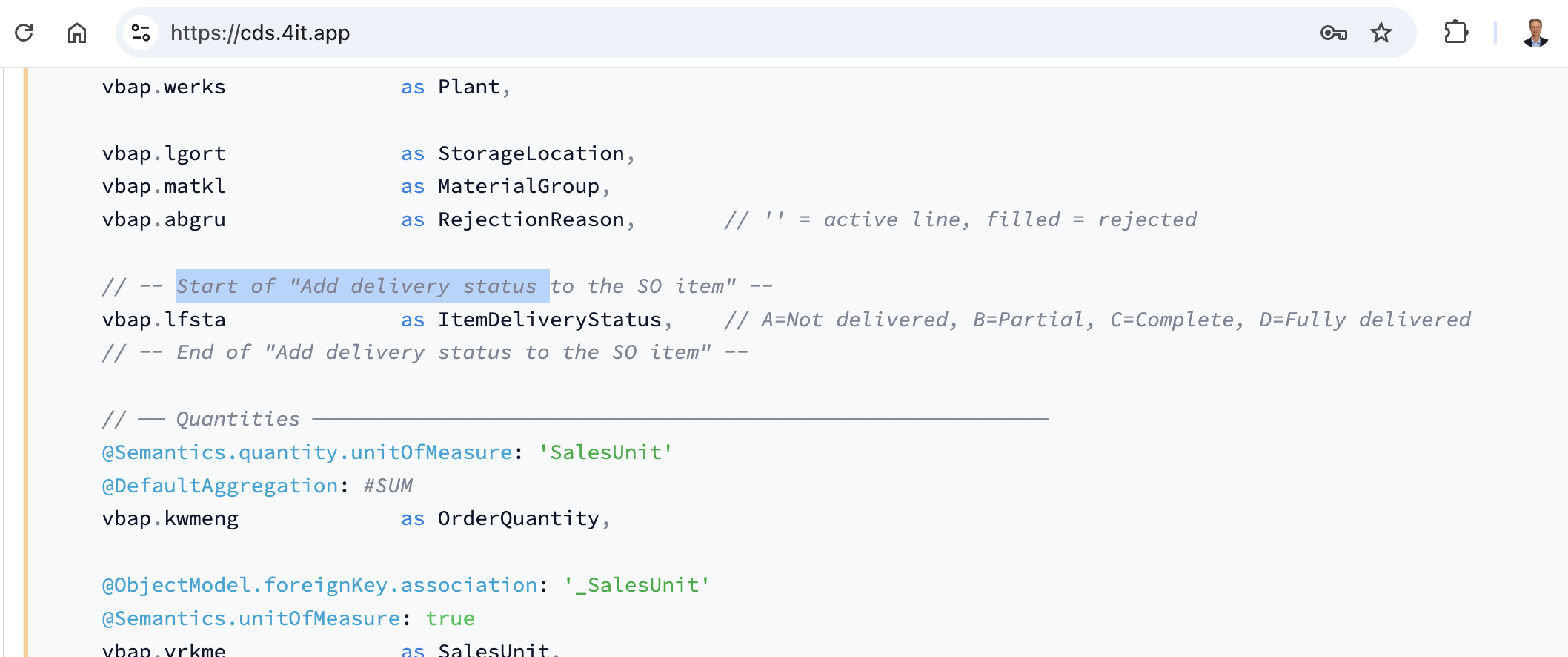
<p>The AI generates a complete, correctly annotated ABAP CDS view — preserving the original structure, all existing annotations, and the naming patterns of the source — and saves it directly to the customer's folder on the Azure File Share.</p>
<p><img decoding="async" loading="lazy" alt="CDS Designer — AI-generated modification with traceable markers" src="https://support.4it.app/assets/images/cds-designer-code-5e3b4682cf18ce525a77cfe99ce54d08.png" width="2116" height="886" class="img_ev3q"></p>
<p>A particularly useful feature is the <strong>modification marker</strong> convention. Every line of code added by the AI is wrapped between named start and end comments:</p>
<div class="language-abap codeBlockContainer_Ckt0 theme-code-block" style="--prism-color:#393A34;--prism-background-color:#f6f8fa"><div class="codeBlockContent_QJqH"><pre tabindex="0" class="prism-code language-abap codeBlock_bY9V thin-scrollbar" style="color:#393A34;background-color:#f6f8fa"><code class="codeBlockLines_e6Vv"><span class="token-line" style="color:#393A34"><span class="token plain">// -- Start of "Add delivery status to the SO item" --</span><br></span><span class="token-line" style="color:#393A34"><span class="token plain">vbap.lfsta    as ItemDeliveryStatus,</span><br></span><span class="token-line" style="color:#393A34"><span class="token plain">// -- End of "Add delivery status to the SO item" --</span><br></span></code></pre></div></div>
<p>This makes it immediately clear — both in the tool and in any downstream code review — exactly what was changed from the standard template and why. The result is displayed in an editable text area, so the partner can make further adjustments before saving, and the saved file is immediately visible in the App tab for the owning customer.</p>
<hr>
<h2 class="anchor anchorTargetStickyNavbar_Vzrq" id="cds-manager--your-cds-view-catalogue-at-a-glance">CDS Manager — your CDS view catalogue at a glance<a href="https://support.4it.app/blog/aicds-setup-tab-cds-designer-manager-sql#cds-manager--your-cds-view-catalogue-at-a-glance" class="hash-link" aria-label="Direct link to CDS Manager — your CDS view catalogue at a glance" title="Direct link to CDS Manager — your CDS view catalogue at a glance" translate="no">​</a></h2>
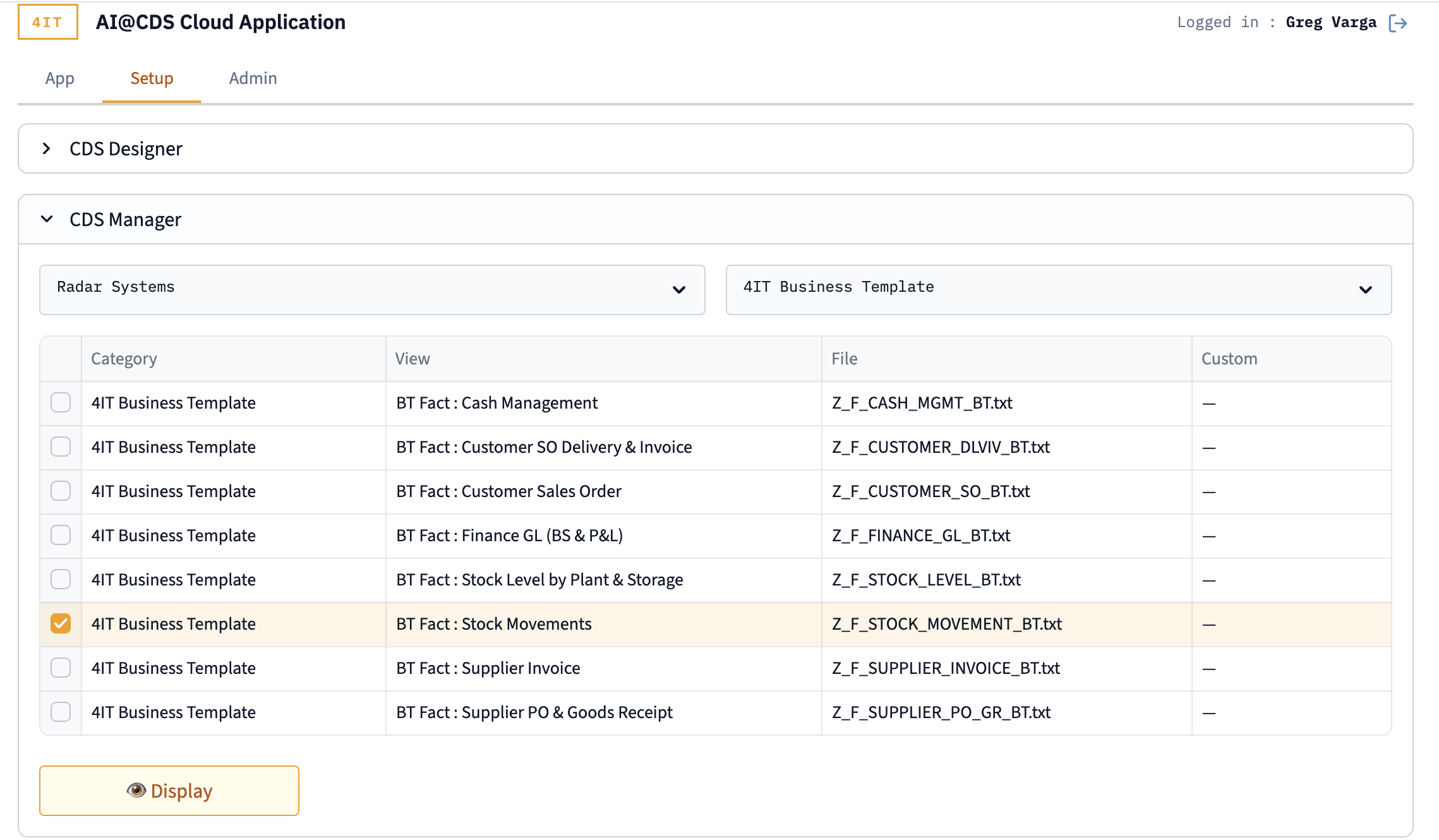
<p>The CDS Manager provides a searchable, filterable catalogue of all CDS views available for a given customer and category. Selecting a view and clicking <strong>Display</strong> renders the full source code with syntax highlighting and a one-click copy button.</p>
<p><img decoding="async" loading="lazy" alt="CDS Manager — browsing 4IT Business Template views" src="https://support.4it.app/assets/images/cds-manager-list-43370f2270c23ee67c21fc3c2c3e704d.png" width="2278" height="1330" class="img_ev3q"></p>
<p>The catalogue table shows four columns for each view: the category, the human-readable view label, the file name on the Azure File Share, and a <strong>Custom</strong> flag that indicates whether the row is a standard 4IT template or a customer-specific variant created by the CDS Designer.</p>
<p>This is particularly useful during implementation workshops — a consultant can pull up the exact CDS source of any Business Template mid-conversation, show a customer which fields and joins are already available, and identify where a custom enhancement would need to be added.</p>
<hr>
<h2 class="anchor anchorTargetStickyNavbar_Vzrq" id="sql-manager--zero-effort-cds-to-sql-conversion">SQL Manager — zero-effort CDS-to-SQL conversion<a href="https://support.4it.app/blog/aicds-setup-tab-cds-designer-manager-sql#sql-manager--zero-effort-cds-to-sql-conversion" class="hash-link" aria-label="Direct link to SQL Manager — zero-effort CDS-to-SQL conversion" title="Direct link to SQL Manager — zero-effort CDS-to-SQL conversion" translate="no">​</a></h2>
<p>The SQL Manager addresses a common friction point in cloud analytics projects: translating ABAP CDS views into executable SQL for Azure Synapse, BigQuery, Databricks, or Snowflake.</p>
<p>ABAP CDS and SQL are fundamentally different languages. CDS uses annotation-heavy syntax, lazy association definitions, ABAP-specific data types, and currency/unit semantics that have no direct SQL equivalent. Doing this translation manually is tedious and error-prone, especially across a full catalogue of Business Templates.</p>
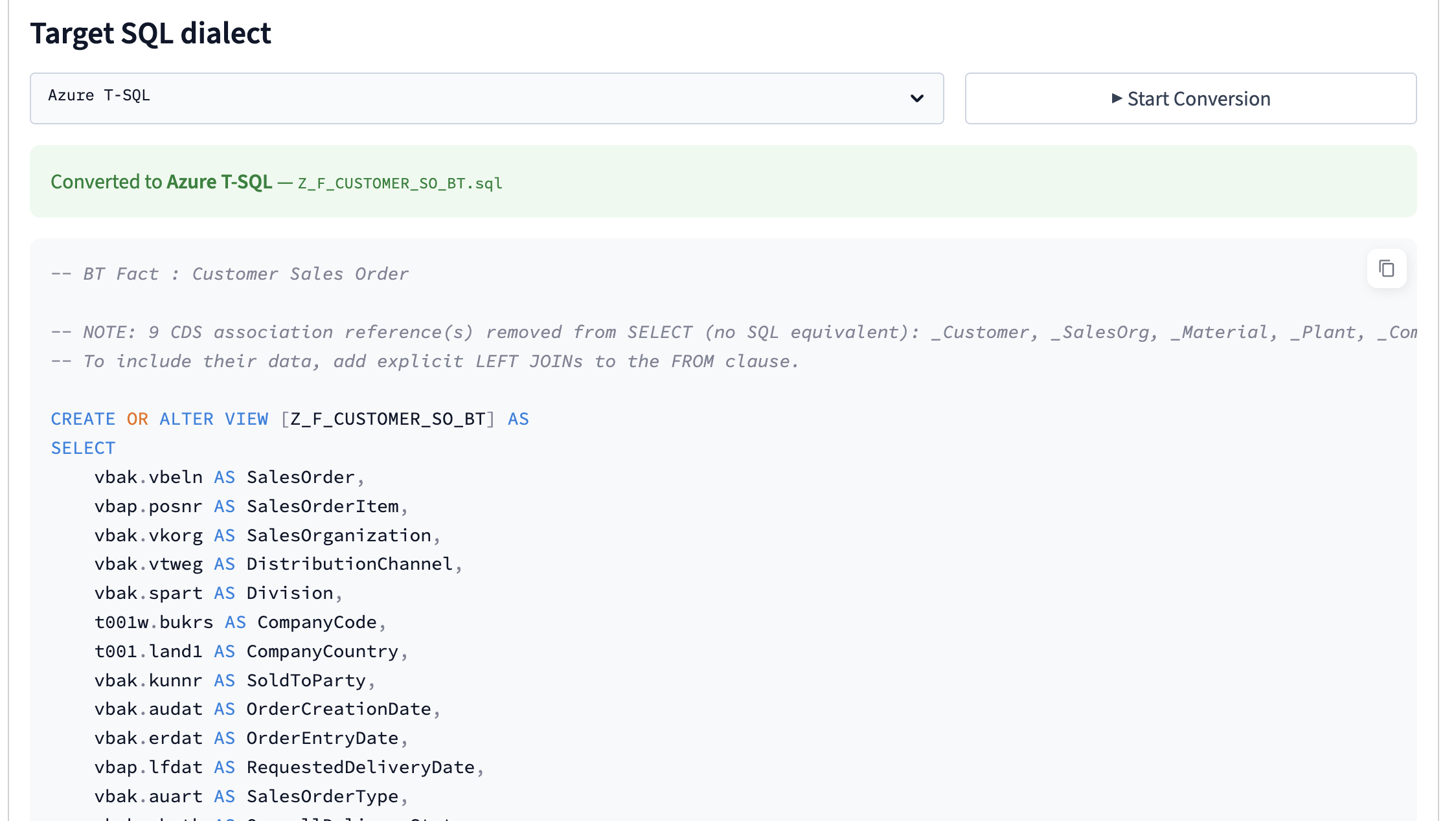
<p>The SQL Manager automates the entire process. Select a CDS view, choose your target dialect, and click <strong>▶ Start Conversion</strong>. Within seconds you have a complete, platform-ready SQL file.</p>
<p><img decoding="async" loading="lazy" alt="SQL Manager — converted Azure T-SQL output" src="https://support.4it.app/assets/images/sql-manager-result-ccb532f4f73f0b63c0b4e51c1e5bae35.png" width="2248" height="1268" class="img_ev3q"></p>
<p>The conversion handles:</p>
<ul>
<li class=""><strong><code>CREATE OR REPLACE VIEW</code></strong> syntax per dialect (bracket quoting for T-SQL, backtick for BigQuery, double-quote for Snowflake)</li>
<li class=""><strong>ABAP data type mapping</strong> — <code>NVARCHAR</code> for Azure, <code>STRING</code> for BigQuery, <code>VARCHAR</code> for Databricks and Snowflake, with correct length and precision handling</li>
<li class=""><strong>CDS associations</strong> — lazy join definitions that have no SQL equivalent are converted to commented-out <code>LEFT JOIN</code> statements appended at the end of the SQL, with a clear guide on how to activate them by adding the required fields to the SELECT clause</li>
<li class=""><strong>Annotations</strong> stripped and replaced with standard SQL comments</li>
<li class=""><strong>Currency and unit semantics</strong> preserved as regular character/decimal fields</li>
</ul>
<p>The conversion is performed entirely in Python using rule-based regex transformations — no AI call is made — which means it is fast, deterministic, and produces consistent results for the same input. Conversion rules are managed in a YAML configuration file, making it straightforward to add support for additional dialects or adjust type mappings for a specific platform version.</p>
<hr>
<h2 class="anchor anchorTargetStickyNavbar_Vzrq" id="what-this-means-for-implementations">What this means for implementations<a href="https://support.4it.app/blog/aicds-setup-tab-cds-designer-manager-sql#what-this-means-for-implementations" class="hash-link" aria-label="Direct link to What this means for implementations" title="Direct link to What this means for implementations" translate="no">​</a></h2>
<p>The three tools in the Setup tab represent a step change in how AI@CDS supports the full implementation lifecycle — not just the exploration phase. A partner can now move from <em>"here is what the standard BT contains"</em> to <em>"here is your customer-specific variant, ready to transport"</em> to <em>"here is the SQL view for your Databricks environment"</em> without leaving the browser.</p>
<p>All three panels are available to users with the Partner or 4IT role. Custom views created by the CDS Designer are scoped to the owning customer and never visible to other customers in the application.</p>
<p>Full documentation for the Setup tab is available in the <a class="" href="https://support.4it.app/AI_CDS/cloud-application/setup-tab">AI@CDS documentation</a>.</p>]]></content>
        <author>
            <name>Greg Varga</name>
        </author>
        <category label="AI@CDS" term="AI@CDS"/>
        <category label="setup" term="setup"/>
        <category label="cds-designer" term="cds-designer"/>
        <category label="sql-manager" term="sql-manager"/>
        <category label="Feature" term="Feature"/>
        <category label="business-template" term="business-template"/>
    </entry>
    <entry>
        <title type="html"><![CDATA[4IT Services and RapidViews: Powering End-to-End SAP Analytics]]></title>
        <id>https://support.4it.app/blog/4it-rapidviews-partnership</id>
        <link href="https://support.4it.app/blog/4it-rapidviews-partnership"/>
        <updated>2026-03-01T00:00:00.000Z</updated>
        <summary type="html"><![CDATA[RapidViews delivers a comprehensive library of SAP-certified CDS views covering all major S/4HANA business domains — Finance, Sales, Manufacturing, and more — providing a rich, ready-to-use semantic and business layer that dramatically accelerates analytics projects and ensures data consistency across reporting tools.]]></summary>
        <content type="html"><![CDATA[<p><a href="https://www.rapidviews.io/" target="_blank" rel="noopener noreferrer" class="">RapidViews</a> delivers a comprehensive library of SAP-certified CDS views covering all major S/4HANA business domains — Finance, Sales, Manufacturing, and more — providing a rich, ready-to-use semantic and business layer that dramatically accelerates analytics projects and ensures data consistency across reporting tools.</p>
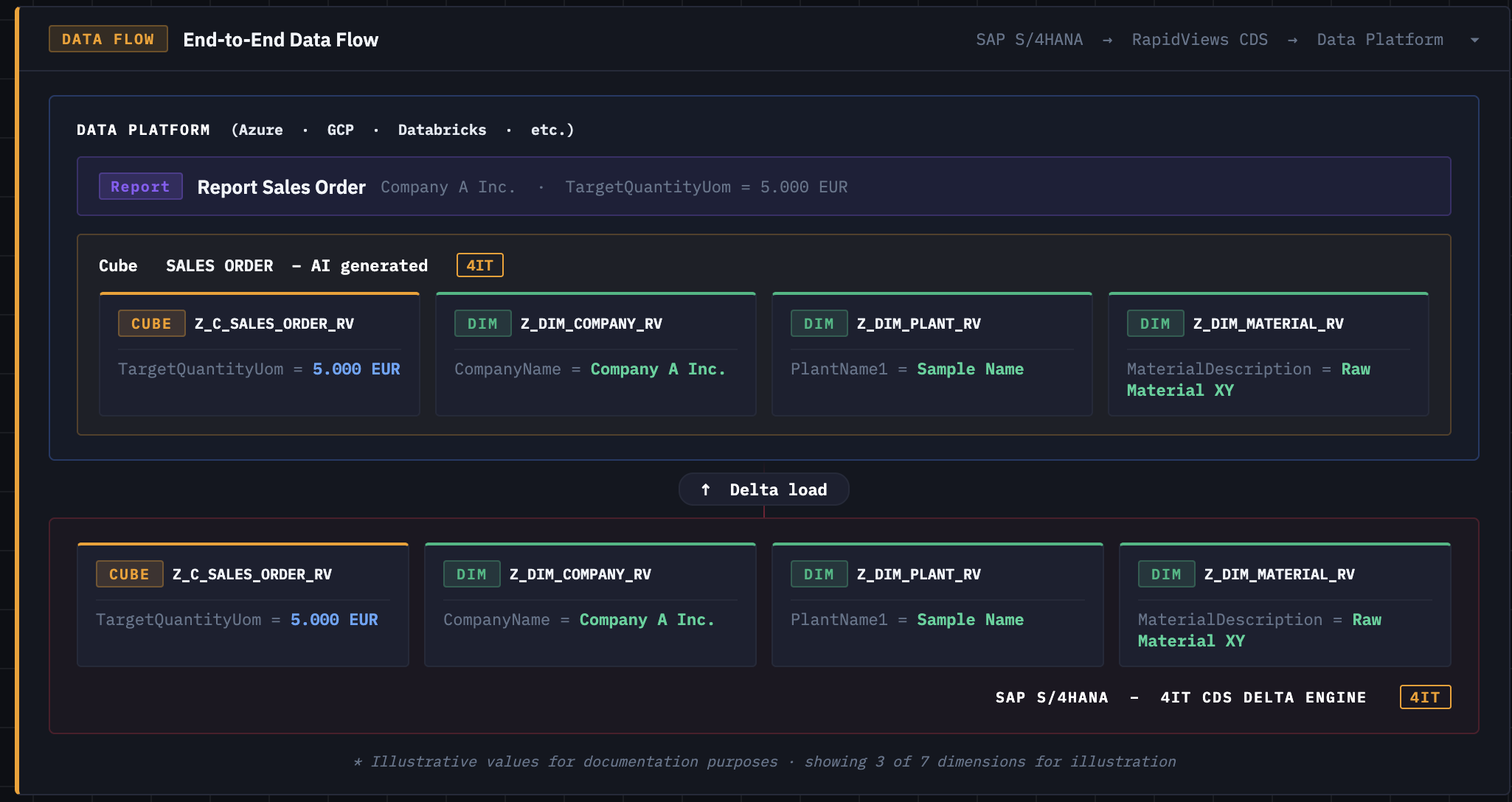
<p><img decoding="async" loading="lazy" alt="End-to-End Data Flow" src="https://support.4it.app/assets/images/dataflow-fa0cee58f564a8c4c5757fbd318ba9ab.png" width="2050" height="1088" class="img_ev3q"></p>
<p>4IT Services and RapidViews have agreed to combine their strengths to offer a complete end-to-end data delivery pipeline for SAP customers. RapidViews contributes its powerful business and semantic CDS layers, built on deep SAP expertise, while 4IT Services provides its <strong>4IT CDS Delta Engine</strong> — a high-performance extraction engine that captures real-time changes from S/4HANA and delivers them to any cloud data platform, whether Azure, GCP, Databricks, or beyond. Together, the two solutions eliminate the complexity of building custom extractors and semantic models from scratch, giving data teams a fast, reliable, and governed path from SAP source to analytics-ready data.</p>]]></content>
        <author>
            <name>Greg Varga</name>
        </author>
        <category label="Partnership" term="Partnership"/>
        <category label="RapidViews" term="RapidViews"/>
        <category label="SAP S/4HANA" term="SAP S/4HANA"/>
        <category label="Data Platform" term="Data Platform"/>
    </entry>
    <entry>
        <title type="html"><![CDATA[New Chat Feature Available in AI@CDS]]></title>
        <id>https://support.4it.app/blog/aicds-chat-feature</id>
        <link href="https://support.4it.app/blog/aicds-chat-feature"/>
        <updated>2026-01-07T00:00:00.000Z</updated>
        <summary type="html"><![CDATA[We are excited to announce the launch of the Chat feature in the AI@CDS Cloud Application — a conversational interface that lets business and BI users explore 4IT Business Templates and RapidViews CDS layers using plain language. No need to browse through hundreds of CDS views manually: simply ask a question and get instant, context-aware answers directly from your S/4HANA data model.]]></summary>
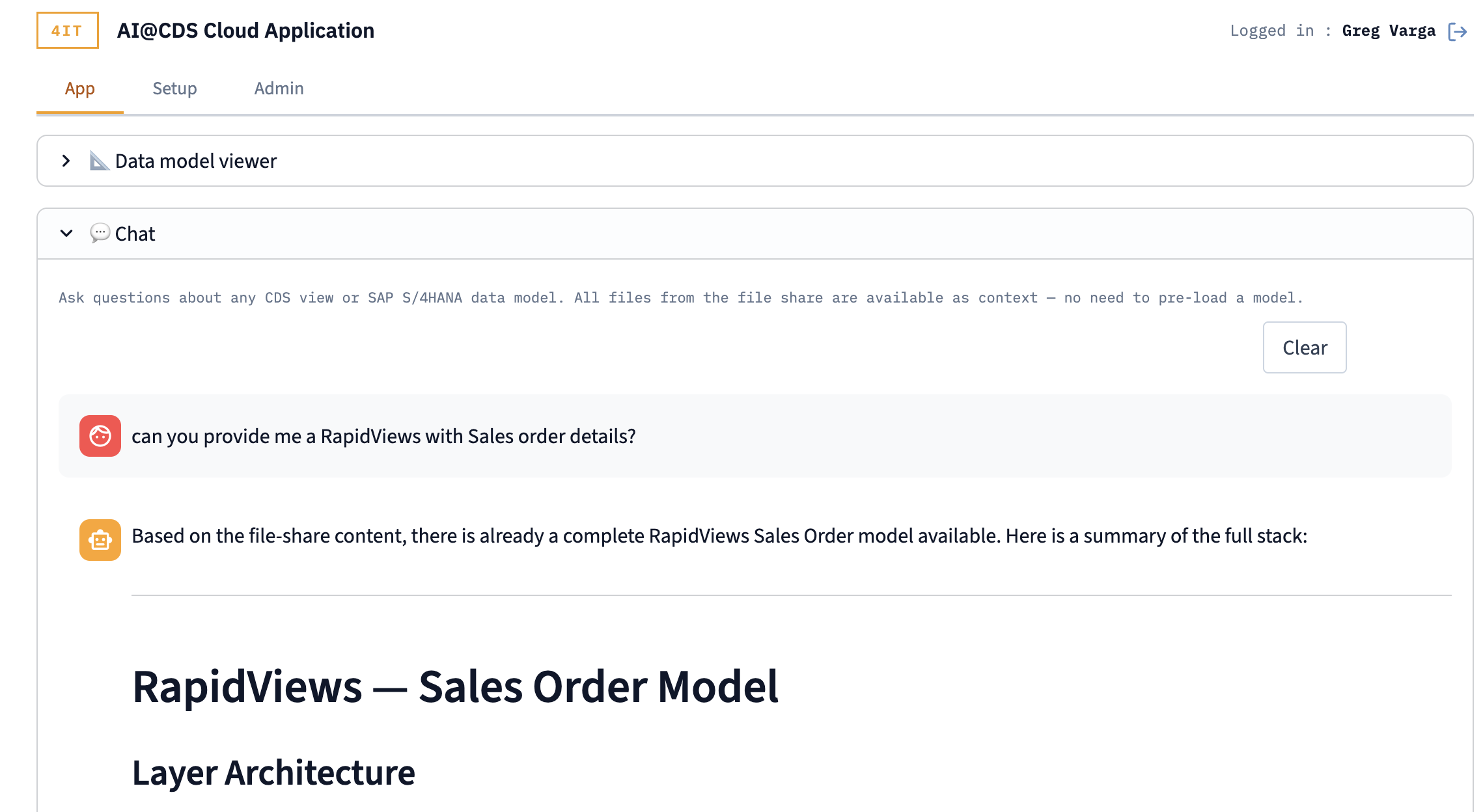
        <content type="html"><![CDATA[<p>We are excited to announce the launch of the <strong>Chat</strong> feature in the AI@CDS Cloud Application — a conversational interface that lets business and BI users explore 4IT Business Templates and RapidViews CDS layers using plain language. No need to browse through hundreds of CDS views manually: simply ask a question and get instant, context-aware answers directly from your S/4HANA data model.</p>
<p><img decoding="async" loading="lazy" alt="AI@CDS Chat Feature" src="https://support.4it.app/assets/images/chat-feature-8e5d6aa7016b7c756fcda1a5addaaedc.png" width="2278" height="1248" class="img_ev3q"></p>
<p>The Chat is powered by a large language model that has full access to all files available on the connected file share, meaning the entire CDS view catalogue is always available as context — without any pre-loading or model selection step. Business users can ask questions such as <em>"where can I find supplier good receipt quantities and how do I link them to supplier invoices?"</em> and receive structured, technically precise answers pointing to the exact CDS views and join keys they need.</p>
<p>This feature bridges the gap between technical SAP data architecture and everyday business intelligence work. Whether you are a BI developer building a new report or a business analyst looking for the right data source, the AI@CDS Chat gives you a knowledgeable co-pilot that understands your data landscape and speaks your language.</p>]]></content>
        <author>
            <name>Greg Varga</name>
        </author>
        <category label="AI@CDS" term="AI@CDS"/>
        <category label="Chat" term="Chat"/>
        <category label="Feature" term="Feature"/>
    </entry>
</feed>